
Trigger - Task Launcher9.3.1 - Google Play
You'll be able to see results in few seconds.
Publisher Description
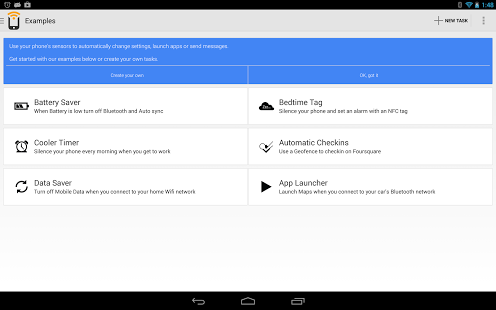
Bored of putting your phone on silent every time you get into the office? Tired of turning off Bluetooth to conserve battery every time juice gets low?
This app interacts with your surroundings to configure settings on your phone automatically. Combine triggers and actions to create tasks, then activate the tasks that you create with conditions that you set!
Here are examples of what you can do:
In your car: Use Bluetooth as a trigger to open GPS and launch your favorite music app
On your nightstand: Program an NFC tag to set your ringer to vibrate, dim your display and set an alarm
In your house: Use WiFi as a trigger to silence your phone, connect to bluetooth, and play your favorite songs.
The current free triggers are as follows:
-NFC
-Bluetooth
-Wifi
And as part of our Pro-Upgrade we also have these additional triggers:
-Battery Level
-Location
-Time triggers
-Charging
-Calendar Events
-Agent
-Headset
And here are a few examples of the actions that you can perform with Trigger task launcher:
- Change WiFi, Bluetooth, mobile hotspot, airplane mode (root users in Jelly Bean and up), auto-sync, GPS and mobile data settings (root users).
- Change your volumes or notification tones.
- Change your display brightness, timeout, auto-rotation, or notification light settings
- Check in on social media like Foursquare or Google Places
- Send messages using Twitter, SMS, Email, or Glympse
- Start or stop Applications (root required for stopping most applications), dock modes, open URLs, speak text, or navigate to an address
- Set Alarms or create calendar events
- MORE!
Trigger is a task launcher that allows you to easily program your device to do the actions you do regularly.
So go ahead and create your own combinations to automate your life. The only limit is what you can come up with!
The Wall Street Journal calls it "living in the future."
Additional actions can be found when experimental features are enabled in advanced settings. Auto lock screen and airplane mode are restricted by Android but we've created some work around solutions for these actions. (Note: They aren't 100% reliable which is why they're classed as "experimental features").
Some demos can be viewed on the application website
Note: When using NFC Tags you can create a Switch task that will toggle between two tasks with each tap.
We're always working on adding new actions to Tasks. Please get in touch if there's something you'd like to do that's not currently offered.
This application supports NFC Forum Type 1, Type 2, Type 3 and Type 4 Tags as well as third party NFC Enabled tags like the MIFARE Classic, DESFire, Ultralight and Ultralight C. Now supporting read-only tags & allowing you to write any amount of data to any tag using Tagstand's cloud service. This allows you to use your tags just as you would any writable tag without worrying about size.
All permissions are listed and explained here: https://sites.google.com/site/triggerwiki/permissions
This app uses Google Analytics for aggregate, anonymous data collection, which can be opted out of from the settings page.
About Trigger - Task Launcher
The company that develops Trigger - Task Launcher is Coleridge Apps LLC. The latest version released by its developer is 9.3.1.
To install Trigger - Task Launcher on your Android device, just click the green Continue To App button above to start the installation process. The app is listed on our website since 2019-04-22 and was downloaded 0 times. We have already checked if the download link is safe, however for your own protection we recommend that you scan the downloaded app with your antivirus. Your antivirus may detect the Trigger - Task Launcher as malware as malware if the download link to com.jwsoft.nfcactionlauncher is broken.
How to install Trigger - Task Launcher on your Android device:
- Click on the Continue To App button on our website. This will redirect you to Google Play.
- Once the Trigger - Task Launcher is shown in the Google Play listing of your Android device, you can start its download and installation. Tap on the Install button located below the search bar and to the right of the app icon.
- A pop-up window with the permissions required by Trigger - Task Launcher will be shown. Click on Accept to continue the process.
- Trigger - Task Launcher will be downloaded onto your device, displaying a progress. Once the download completes, the installation will start and you'll get a notification after the installation is finished.
Program Details
System requirements
Download information
Pricing
Version History
version 9.3.1
posted on 2019-04-22
Improved UX by fixing crashes and bugs.
If you have any issues please reach out to us at help+trigger@coleridgeapps.com.
version 9.3.0
posted on 2016-11-22
Fixes Android N crash when rebooting phone.,If you have any issues please reach out to us at help@coleridgeapps.com.
version 2.8.0
posted on 2011-06-06
Several fixes and updates
Disclaimer
Official Google Play Link
We do not host Trigger - Task Launcher on our servers. We did not scan it for viruses, adware, spyware or other type of malware. This app is hosted by Google and passed their terms and conditions to be listed there. We recommend caution when installing it.
The Google Play link for Trigger - Task Launcher is provided to you by apps112.com without any warranties, representations or guarantees of any kind, so access it at your own risk.
If you have questions regarding this particular app contact the publisher directly. For questions about the functionalities of apps112.com contact us.
